
How to View a Huddle
This guide shows you how to locate and open a specific Huddle within your deployment for review or collaboration.
🧭 Step-by-Step Instructions
Step 1: Open the Deployment
Navigate to your deployment's home page.
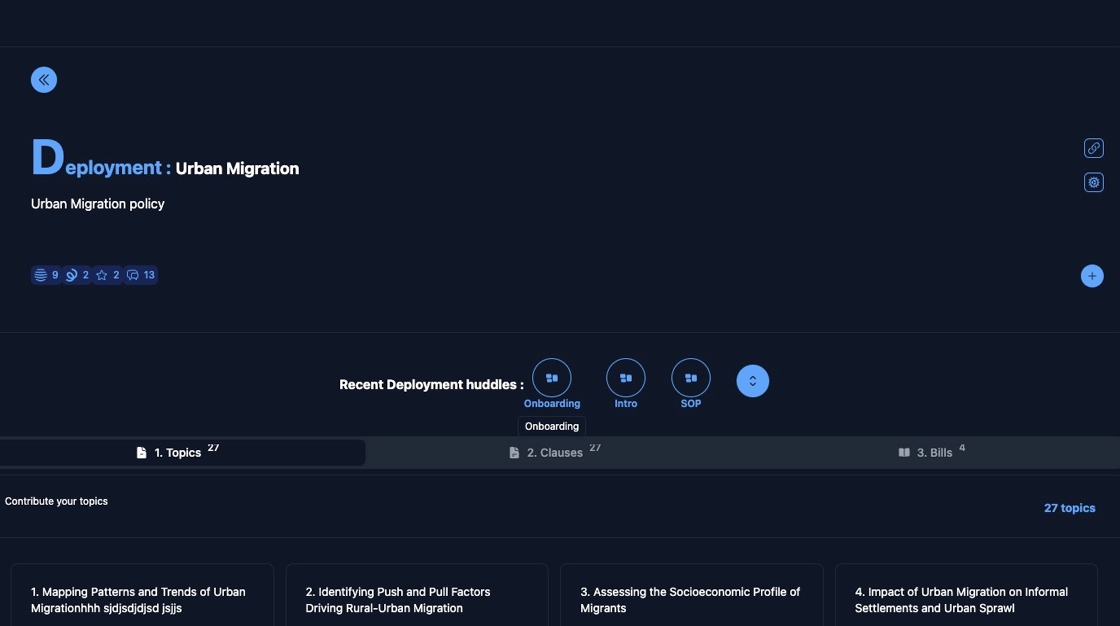
Step 2: Select a Huddle
You can access a Huddle in three ways:
- From the list of all Huddles
- From the search results
- From the Recent Deployment Huddles section
Click on the Huddle you want to open, e.g., "Mapping huddle".

Step 3: View the Huddle
Once the Huddle page loads, you can explore its full content.

✅ Success! You've accessed a Huddle.
To explore further features like commenting or sharing, continue with the relevant guides in the Huddle documentation.
⚙️ What You Can Do in a Huddle
- 🔍 View detailed Huddle content
- 💬 Comment to participate in discussions
- 📤 Share the Huddle with others
- 🧭 Maximize the view for easier reading
- 📌 View the Origin of the Huddle
- 👥 Invitee collaborators to join
🚫 Access Denied?
If you're not permitted to view a Huddle, you may see a restriction notice.
🛑 Click the “Go Back” button to return to the previous screen.

Need more help? Check the full Huddle documentation.